


AI Chat & Friends - SeaHot
3.119.00 Reviews
App Specs
- Version
- 1.7.7.1786613910
- Updated On
- License
- Free
- Downloads
- 100,000+
- Developer
- Seaart ai
- Categories
- Social
- Platform
- Android
Screenshots
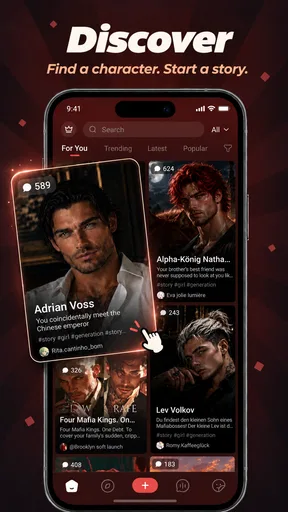

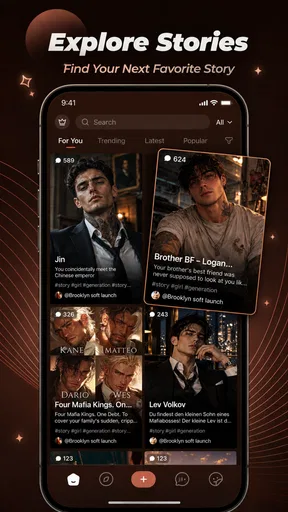


 Analysis by AppCompare
I tried AI Chat & Friends - SeaHot as a social app built around conversations with AI characters, and I found that its appeal is less about replacing a normal messaging service and more about creating a personal, low-pressure space to explore ideas, stories, and different conversational styles. It is free to install, aimed at a Teen audience, and developed by Seaart ai. The basic concept is easy to understand: open the app, meet AI characters, chat with them, and browse an ongoing feed where interactions and shared content are the main attraction.
That sounds simple, but the experience changes depending on who is using it and where. On a personal phone, it can feel like a casual creative companion. On a tablet or phone used by several people at home, the important questions become different: who is signed in, what conversations are visible, and whether one person’s activity is being mistaken for another’s. I would not treat it like a shared family noticeboard. I would treat it as an individual social space that happens to be usable on a household device.
How SeaHot fits into a shared household
A realistic example is a family tablet that stays in the living room. One person may use it to chat with an AI character while relaxing, another may open the feed to look for creative prompts, and a teenager may want to try a longer role-play conversation. SeaHot can suit those separate moments because it does not require everyone to be looking for the same kind of interaction. The problem is that the app’s social and conversational nature makes personal boundaries more important than they would be in a simple puzzle or weather app.
I would begin by deciding whether the tablet is genuinely shared or whether it is effectively one person’s device. If it is shared, I would avoid leaving an active session open and would make a habit of returning to the app’s starting screen when finished. That is not a special SeaHot feature; it is sensible behavior for any app where conversations, preferences, or feed activity may reflect the person who last used it. A household that wants completely separate experiences will be more comfortable if each user has their own device or clearly separated account access.
The app’s endless-feed design is convenient when I want to browse without planning a specific activity. I can move from one piece of AI-related content or character interaction to another instead of starting from a blank page. At the same time, an endless feed can encourage quick, unplanned browsing. For shared use, I would set an informal time limit, especially when younger household members are using the same device. The feed is easy to enter casually and harder to treat as a clearly bounded task.
That makes SeaHot a better fit for a household that already talks openly about device use than for one looking for a tightly managed family platform. I would recommend it to an adult or older teen who understands that an AI social feed is a place for exploration, not a private diary and not a substitute for real-world supervision.
What the first session feels like
The first useful test is not whether the app can keep a conversation going. It is whether the conversation feels worth continuing after the novelty fades. I found the character-based approach more engaging when I gave the interaction a clear purpose. Asking for a writing prompt, exploring a fictional situation, or testing how a character responds to a change in tone is more rewarding than repeatedly sending short greetings.
Worth Reading Before You Choose

Flipboard Shows What News Apps Must Do Beyond the Feed

Switching to Android Auto Means Rethinking Your Driving Routine

Google Calendar Makes a Crowded Week Easier to Manage

Ludo King Makes the Most of the Minutes Between Plans

Baby Panda World Brings Quick Play to Modern Phones, but Its Game Library Feels Busy

ESPN’s Live Game View Makes Following Close Games Easier
For a shared device, I would suggest that each person start with a different purpose rather than simply opening the same feed. One user might use SeaHot for creative brainstorming, while another might explore conversational entertainment. This reduces the chance that someone sees an unfamiliar thread and assumes it belongs to them. It also makes the app easier to evaluate: after a few sessions, you can tell whether it is genuinely useful or merely absorbing attention.
The app is available for devices running Android 7.0 or later, which makes it accessible to many older Android phones and tablets. That is helpful for households that pass devices between family members, although an older device may not feel as comfortable for long conversations as a newer one. Screen size, keyboard quality, and general responsiveness matter here because the main activity is reading and typing rather than tapping through a short game.
Keeping accounts and conversations separate
SeaHot is not the kind of app I would casually hand from one person to another while assuming everyone’s experience will remain separate. Before anyone else uses a shared device, I would check which account is active and whether the previous user has left a conversation open. I would also avoid using another person’s profile as a shortcut to the feed. Even when there is no sensitive material involved, personal recommendations and chat history can quickly become confusing when several people mix their activity.
This is one of the less obvious trade-offs of AI social apps. A normal shared browser can feel relatively neutral because pages are temporary. A character conversation feels more personal, even when it is generated. If a child, parent, or guest opens the app and continues from someone else’s thread, the resulting interaction may be awkward or misleading. The safest household workflow is simple: one user at a time, no unattended open session, and a clear understanding of whose account is active.
I would also separate experimentation from anything a person wants to preserve. If I am using the app to develop a story idea or test dialogue, I would copy important notes elsewhere rather than assuming the conversation itself is a reliable long-term workspace. SeaHot is primarily a social and interactive experience, not a dedicated writing archive. That distinction matters for students, hobby writers, and anyone who may want to return to an idea weeks later.
Coordinating use without pretending it is a family-control app
For household coordination, I would use ordinary routines rather than expect the app to organize the family. A shared charging area, an agreed time for personal use, and a rule against leaving accounts open will do more than treating the feed as a common family activity. SeaHot can be discussed between household members, but I would not assume that everyone should read or participate in the same conversations.
A useful approach is to agree on the purpose before opening the app. If someone wants creative help, they can use a short session to generate ideas and then leave. If someone wants entertainment, they can browse the feed separately. This prevents the common problem where one person’s quick experiment turns into another person’s long, unexplained session on the same device.
There is also a practical cost boundary to consider. The app itself is free, but optional in-app purchases range from ninety-nine cents to two hundred ninety-nine dollars and ninety-nine cents per item. I would not let a shared device be used for unsupervised purchasing. Adults should review the device’s purchase settings and explain clearly that “free to install” does not mean every part of the experience is free. This is especially important when a younger user is curious about characters, content, or enhanced interactions.
That pricing range changes my recommendation for families. I can see the app working well when an adult has installed it deliberately and household members know who is responsible for purchases. I would be much more cautious about leaving it available on a child-accessible tablet without a conversation about spending. The risk is not that every user will buy something; it is that the free entry point can make optional costs easy to overlook.
Teen rating, trust, and the role of an adult
SeaHot carries a Teen content rating, so I would not present it as a children’s app. The rating should shape how it is introduced at home: older users can explore it with reasonable independence, while younger users need an adult to decide whether the app fits their maturity and the household’s expectations. A rating is useful context, but it is not a substitute for knowing how a particular child responds to interactive characters and open-ended feeds.
My main trust concern is the conversational format. AI characters can sound confident, friendly, or emotionally responsive even though the interaction is generated. I would remind younger users not to treat a character as a real friend, counselor, or authority. I would also discourage sharing personal information, family details, passwords, school information, or anything that would be uncomfortable to place in a social app. That advice is particularly important when the conversation feels private and attentive.
For parents, the most constructive approach is to ask what the user is doing rather than simply banning the app on sight. Is the teenager writing scenes, browsing characters, or looking for companionship after a difficult day? The answer affects whether SeaHot is being used as a creative toy, a social distraction, or emotional support. I would be comfortable with the first two in a suitable household setting. I would not want it to become the only place a young person turns when they need real human help.
The Teen rating also affects shared-device etiquette. A younger sibling may see the app icon and assume it is suitable for them because another family member uses it. I would explain that different members of the household can have different apps and different levels of independence. That small conversation prevents the app from being treated as a universal family entertainment product.
Where it beats ordinary social alternatives
Compared with a conventional messaging app, SeaHot has a lower social barrier. I do not need to wait for a friend to reply, arrange a group, or worry about interrupting someone. That makes it useful when I want to test an idea immediately or enjoy a conversation with a fictional angle. It is also more interactive than simply scrolling through a static social feed because the point is to respond and shape the exchange.
Compared with a standard chatbot, the social feed and character framing give the experience more atmosphere. I am not only asking isolated questions; I am browsing an environment designed around AI personalities and shared discovery. That can make creative exploration feel more playful. The trade-off is that SeaHot may be less efficient when I need precise, structured answers. For research, formal writing, coding, or dependable factual work, I would choose a tool designed around those tasks instead.
Compared with a private journaling app, SeaHot is less suitable for sensitive reflection. The social presentation and character interaction encourage experimentation, but they do not provide the same sense of a controlled personal record. Compared with a family communication app, it is also the wrong choice for schedules, chores, reminders, or household announcements. Its strength is imaginative interaction, not coordination in the practical sense.
That distinction helps explain the average rating of 3.1 from around 354 ratings. I would not read that figure as a verdict that the concept fails. It suggests that the experience may depend heavily on expectations, device setup, and whether someone wants entertainment or a utility. A user expecting a polished productivity assistant could be disappointed, while someone looking for AI characters and casual discovery may find the format more natural.
Small habits that make the experience better
My first tip is to give each conversation a job. Instead of opening a character and hoping the exchange becomes interesting, I would start with a scenario, a question about a fictional world, or a request for several different creative directions. This produces more useful interactions and makes it easier to decide when the session is finished.
My second tip is to treat the feed as a source of prompts rather than an obligation to keep scrolling. When I find an idea worth developing, I would leave the feed and work on that idea separately. Endless browsing is good for discovery but weak for follow-through. The app becomes more valuable when it leads to an activity outside the feed instead of becoming the activity itself.
My third tip is especially relevant to shared devices: create a clear handoff routine. Finish the conversation, return to a neutral screen, check the active account, and put the device away. This takes less time than explaining an unexpected character interaction to another family member. It also protects the next user from accidentally continuing a conversation they did not start.
A fourth useful habit is to keep spending decisions separate from browsing. I would never let a child explore a free app while assuming purchases are impossible. Adults should decide in advance whether any optional content is appropriate and who can approve it. The wide purchase range makes this more than a minor detail.
Performance, version, and everyday practicality
The current version is 1.7.7.1786613910, and the app has passed one hundred thousand installs. That gives it a meaningful user base without making it feel like an unavoidable mainstream social network. For someone deciding whether to try it, the practical takeaway is that SeaHot is established enough to explore, but the relatively modest rating indicates that I would install it with realistic expectations rather than assume a universally smooth experience.
On an older Android device, I would pay attention to typing comfort, scrolling, and how easily the app handles longer sessions. AI conversation apps can feel tiring when the keyboard covers too much of the screen or when returning to a thread takes extra effort. A newer phone is not required by the stated minimum operating system, but the quality of the hardware will still influence how pleasant the app feels.
I would also remember that a social feed is not always predictable. The content that seems interesting during one session may be less relevant during another, and the best experience may require active choices rather than passive scrolling. If I wanted a tightly organized tool with folders, formal projects, or predictable output, I would look elsewhere. If I wanted a flexible place to meet AI characters and follow unexpected creative directions, SeaHot makes more sense.
Who should try it and who should skip it
I would recommend SeaHot to adults and mature teens who enjoy character-driven conversations, creative prompts, and browsing AI-focused social content. It is a good match for someone who wants an immediate activity during a commute, a break, or a quiet evening and does not need every interaction to produce a practical result. It may also suit hobby writers who use character conversations to test personalities or explore dialogue before drafting their own work.
I would skip it if my priority were reliable factual answers, private journaling, family scheduling, or direct communication with real people. I would also skip it for a young child unless an adult had first considered the Teen rating, the open-ended nature of the interactions, and the purchase settings on the device. People who dislike endless feeds may find the format distracting rather than relaxing.
For a shared household, my recommendation is conditional but positive: use it as an individual creative and social app, not as a communal account that everyone casually explores. Keep identities separate, discuss age suitability, and make purchase responsibility explicit. Those steps address the main friction points without pretending SeaHot offers household management tools.
After using it, I see SeaHot as a focused experiment in AI-based social interaction. It is more playful than a conventional assistant and less dependable than a dedicated productivity tool. The free entry point makes trying it easy, while the Teen rating and optional purchases mean it deserves adult awareness in a family setting. Its best use is deliberate, short creative exploration—not unsupervised, unlimited shared-device browsing.
Seaart ai has made an app that can fill an otherwise empty moment with conversation and discovery, but the value depends on how intentionally I use it. I would install it for an older teen or adult who understands the boundaries of AI characters and wants something more interactive than ordinary scrolling. In a household, I would keep the recommendation to one person at a time, with clear account habits and no assumption that the app belongs on every family member’s profile.
Pros
- Offers casual AI conversations for entertainment and companionship.
- Multiple virtual characters can provide different conversation styles.
- Easy interface makes starting a chat quick and straightforward.
- Useful for passing time during short breaks or idle moments.
- May inspire creative roleplay scenarios and imaginative conversations.
Cons
- AI responses may occasionally feel repetitive or lack emotional depth.
- Some features or characters may require in-app purchases or subscriptions.
- Conversations can include inaccurate or contextually inappropriate replies.
- Privacy details should be checked before sharing personal information.
- The app’s entertainment value may decrease after extended use.
FAQs for AI Chat & Friends - SeaHot
What is AI Chat & Friends - SeaHot?
AI Chat & Friends - SeaHot is an entertainment and social-style app built around conversations with AI-powered virtual characters. Users can explore different personalities, start chats, and enjoy role-play or casual interactions designed to feel more personal than a traditional chatbot. The experience may vary depending on the character, available features, and the app’s current version.
Is AI Chat & Friends - SeaHot free to download and use?
The app may be available to download at no initial cost, but some conversations, characters, customization options, or other premium functions can require in-app purchases or a subscription. Before confirming any payment, check the pricing details shown in the store and inside the application. Availability of free messages and premium content may also change over time.
Does SeaHot use real people or artificial intelligence?
The conversations are intended to be generated by artificial intelligence rather than conducted by real friends or professional human advisers. Responses can feel natural, but they may still be repetitive, inaccurate, or inconsistent. Treat the characters as entertainment and avoid relying on their answers for medical, legal, financial, or other important real-world decisions.
Is my information private when I chat in the app?
Before using AI Chat & Friends - SeaHot, review its privacy policy and the permissions requested during installation. Chat messages and account information may be processed to provide, personalize, secure, or improve the service. Avoid sharing passwords, payment details, private photographs, precise location data, or other sensitive information unless you clearly understand how it is collected and stored.
Can children use AI Chat & Friends - SeaHot?
Parents should check the app’s official age rating, content descriptions, and terms before allowing a child to use it. AI character conversations may include mature themes, suggestive language, user-generated material, or interactions that are not suitable for younger audiences. If the app is used by a teenager, parental supervision, privacy settings, and purchase restrictions are recommended.


